ChromeOS monitoring
ChromeOS monitoring, alongside your full fleet
Sync Chromebooks from Google Workspace into the same Watchman Monitoring dashboard as your Mac and Windows computers. Enrollment status, device health and security visibility, without installing an agent on every Chromebook.
- Agentless monitoring
- Connect Google Workspace once, and devices sync automatically on a schedule.
- Mixed-fleet dashboard
- Mac, Windows and ChromeOS in one place, with one monitoring workflow for your team.
- Built for schools and MSPs
- Monitor labs, carts and staff devices, with Education plans for schools and resale licensing for MSPs.
What we monitor on ChromeOS
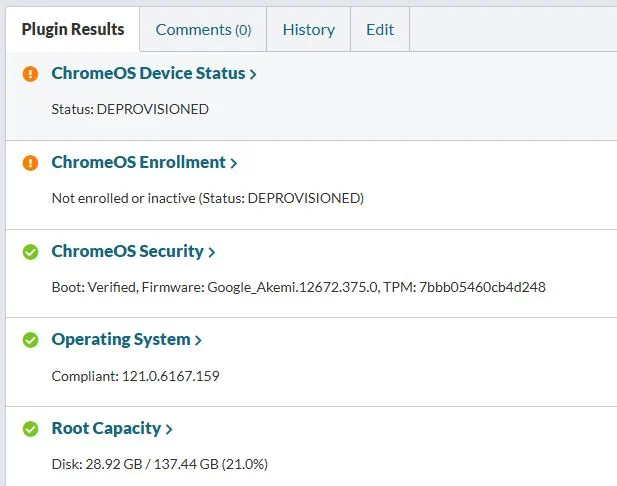
Device inventory, enrollment, security and sync health, pulled from Google Workspace into the same dashboard as the rest of your fleet.
- Device inventory
- Model, serial number, OS version and last sync time from Google Workspace.
- Enrollment and status
- Enrollment state and device status, so you know when a Chromebook drops off your expected baseline.
- Security posture
- ChromeOS security checks, in your dashboard alongside Mac and Windows alerts.
- Sync health
- A dedicated sync indicator, plus email alerts if the Google Workspace connection fails or credentials need attention.
- Fleet visibility
- Chromebooks appear in your Computers list, grouped with the rest of your managed devices.
- Operating system
- ChromeOS version tracking across labs, carts and staff devices.
Proactive, not reactive
Catch issues before they escalate
Chromebooks fail quietly. A cart that stops syncing, a device that unenrolls, a lab that drifts off your security baseline. Watchman Monitoring surfaces those problems before they become a support ticket or a compliance gap.
- Enrollment changes.
- Devices that unenroll or move outside your expected state.
- Stale check-ins.
- Chromebooks that stop reporting on schedule.
- OS version drift.
- Fleets running behind your target ChromeOS version.
- Security gaps.
- Posture changes that need attention before audit season.
- Sync failures.
- Google Workspace connection issues or stale credentials.
See what Watchman Monitoring finds on your fleet.
Start a free 30-day trial. Every feature, no credit card, and most teams see their first findings on the first check-in.