Windows monitoring
Windows monitoring that goes deeper than your RMM
BitLocker, backup failures, SMART warnings, blue screens and disk health, surfaced early by a lightweight read-only agent that runs alongside the tools you already use.
- Backup and encryption visibility
- Know when BitLocker is off or a Veeam job fails, before you need to restore.
- Hardware early warning
- SMART status, disk errors and battery health flagged before failure.
- Same dashboard, every platform
- Mac, Windows, Linux and ChromeOS in one view.
What we monitor on Windows
150+ automated checks, built for Windows. Backups, encryption, hardware health, and the issues your RMM treats as an afterthought.
- Hardware health
- SMART status, physical disks, RAM, laptop battery, GPU and temperature.
- Backup monitoring
- Veeam, Windows Backup, CrashPlan, Carbonite, Macrium Reflect, UrBackup and more.
- Security and encryption
- BitLocker, Windows Defender and third-party antivirus status.
- OS stability
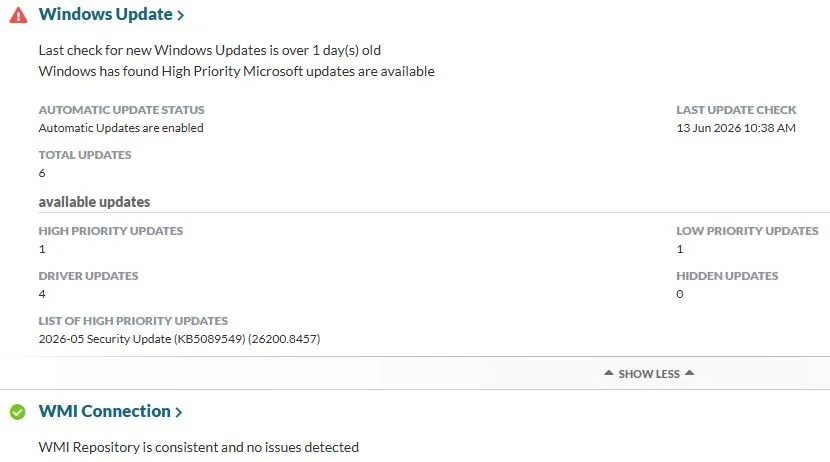
- Blue screens, unexpected reboots, Windows Update status and activation state.
- Storage and performance
- Low disk space, volume health, disk I/O errors and startup items.
- Network and connectivity
- IP changes, adapter issues and network errors that point to flaky hardware or VPN problems.
- Expiration Tracking
- Automatically discover and report upcoming warranty, license and service expirations.
- Contact Menu
- Give users a system tray shortcut to remote support, your helpdesk, or custom resources.
- Beacon Reporting
- Know when key computers have been offline too long, with customizable heartbeat alerts.
Proactive, not reactive
Catch issues before they escalate
Windows computers fail in predictable ways. Failed backups, full disks, disabled encryption, dying drives. Watchman Monitoring surfaces those problems before they become downtime or an angry client call.
- Blue screens and reboots.
- Unexpected reboots and crash patterns, before users report them.
- BitLocker and antivirus.
- Encryption and security posture drift across the fleet.
- Backup failures.
- Veeam, Windows Backup and third-party jobs that stop completing.
- SMART and disk health.
- Failing sectors, disk I/O errors and storage warnings.
- Low disk space.
- Full volumes and boot drive pressure, before apps break.
Alongside your RMM
Watchman Monitoring sits next to your RMM. Read-only checks, no rip-and-replace. Deploy through your RMM or Group Policy, connect your PSA and ticketing tools, and keep Windows monitoring inside the workflow your team already uses, with Mac, Linux and ChromeOS in the same dashboard.
See what Watchman Monitoring finds on your fleet.
Start a free 30-day trial. Every feature, no credit card, and most teams see their first findings on the first check-in.