Mac monitoring
Mac monitoring built for MSPs and IT pros, not bolted on
Watchman Monitoring has watched Mac fleets since 2010. Backups, encryption, hardware health, and the checks your RMM treats as an afterthought.
- Deep macOS coverage
- 150+ automated checks, not a generic agent with Mac features turned off.
- Trusted since 2010
- Born in the Mac admin community, and still the monitoring layer many MSPs install first.
- Apple Business Manager built in
- AppleCare dates, MDM assignment and purchase history from Apple, plus the Macs that have no agent yet.
What we monitor on Mac
150+ automated checks built for macOS. Backups, encryption, hardware health, and the issues your RMM treats as an afterthought.
- Hardware health
- SMART status, RAM, storage, battery cycles and health, and temperature, on Apple silicon and Intel.
- OS stability
- Kernel panics, unexpected reboots, macOS version drift and update status.
- Backup monitoring
- Time Machine, CrashPlan, Carbon Copy Cloner, Backblaze, Retrospect and more.
- Security and encryption
- FileVault, antivirus status, SentinelOne and other security tools common in Mac environments.
- Performance and disk
- Low disk space, startup items, process health and network errors.
- Patch and config management
- Munki, software update status, and MDM-adjacent visibility where your stack has blind spots.
- Expiration Tracking
- Automatically discover and report upcoming warranty, license and service expirations.
- Contact Menu
- Give users a menu bar shortcut to remote support, your helpdesk, or custom resources.
- Beacon Reporting
- Know when key computers have been offline too long, with customizable heartbeat alerts.
Proactive, not reactive
Catch issues before they escalate
A silently failed Time Machine backup ends client relationships. Watchman Monitoring surfaces failed backups, dying disks and encryption gaps early, with alerting you can tune so it doesn't flood your PSA.
- Hardware health.
- SMART status, disk I/O errors, failing sectors, RAM anomalies, battery cycles and health, temperature concerns.
- Storage and filesystems.
- Low-disk thresholds, false mounts, boot volume changes, external drive state.
- OS stability.
- Kernel panics, unexpected reboots, failed POST, crash patterns.
- Performance.
- Free space, runaway processes, startup items, uptime and check-in cadence.
- Networks.
- Excessive link errors and IP changes, to isolate flaky cables, switches or ISP issues.
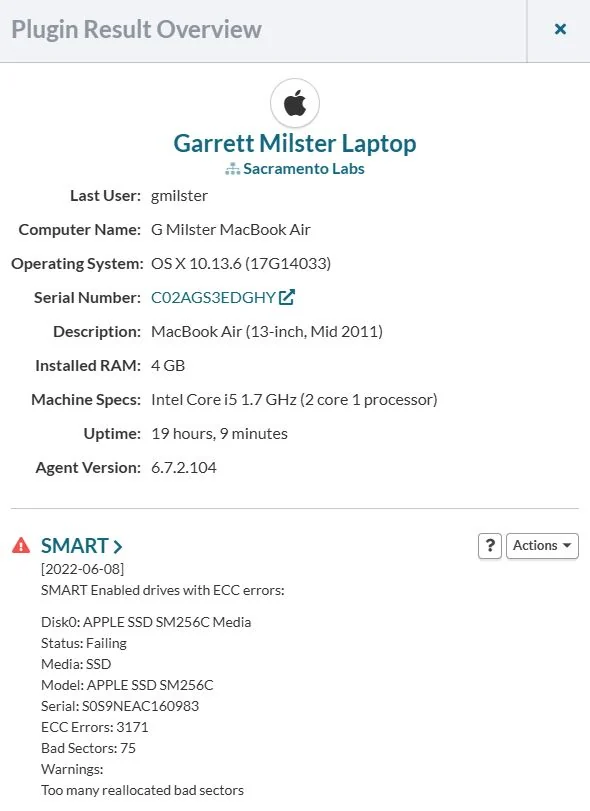
Apple Business Manager & Apple School Manager
What Apple knows about your clients' Macs, next to what the Mac reports
Connect each client's Apple Business Manager or Apple School Manager once. Every hour, the Macs you monitor pick up their AppleCare coverage, MDM assignment and purchase history directly from Apple. Nothing extra is installed on the Macs.
- AppleCare and warranty dates, from Apple
- Coverage type, start and end dates and agreement number land on the Mac's page and in your expiration notices. We also read whether Apple still considers a plan live, so a cancelled plan with an end date months away isn't reported as coverage.
- Which MDM each Mac is assigned to
- See each Mac's MDM server as Apple has it, with Macs assigned to Apple Configurator, or to no MDM at all, called out. It sits alongside the MDM Enrollment check, which reports what's actually on the Mac.
- The Macs you aren't monitoring
- Each connection lists the Macs in Apple Business Manager with no Watchman Monitoring agent, by serial number and the date Apple added them. No on-device check can tell you about a Mac the agent was never installed on.
- Where each Mac came from
- Order number and date, reseller, part number, color, storage and Apple's own model name, plus a purchase report per client and every field in your CSV exports.
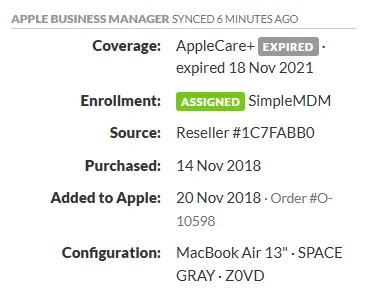
Set up takes an API account in Apple Business Manager and three values pasted into the Dashboard. One connection per client organization, each syncing on its own.
Alongside your Mac stack
Watchman Monitoring sits next to your MDM and RMM. Read-only checks, no rip-and-replace. Deploy alongside Addigy, Mosyle or Jamf while your Windows RMM handles what it already handles. Ticketing integrations, webhooks and the rebrandable Contact Menu keep monitoring inside your workflow, not in another pane of glass.
See what Watchman Monitoring finds on your fleet.
Start a free 30-day trial. Every feature, no credit card, and most teams see their first findings on the first check-in.