One source of truth
Every computer you manage, in one place
Most IT teams run an MDM for Apple and an RMM for Windows. Chromebooks sit in Google Workspace, and Apple Business Manager knows what your clients bought. No single tool sees all of it, so a Mac nobody set up can go unwatched for months. Watchman Monitoring does: every platform, every client, in one dashboard.
- MacsAgent, deployed with your MDM
- Windows PCsAgent, deployed with your RMM
- Linux serversAgent, one compiled binary
- ChromebooksSynced from Google Workspace
- Apple Business ManagerPurchases, AppleCare, MDM assignment

- Every computer, and when it last checked in
- 150+ checks, no scripts to write
- Warranties and expirations tracked
- Tickets in your PSA
- Counts and reports for billing
Keep your MDM and your RMM
The layer that sits across all of them
Watchman Monitoring doesn't replace the tools that manage your fleet. It's the read-only layer above them. Deploy the agent with Jamf, Mosyle, Addigy, Kandji or your RMM, connect Google Workspace and Apple Business Manager, and every computer from every client lands in the same list, with the same checks, the same alerts and the same reports.
Coverage
See what checked in where, and what never did
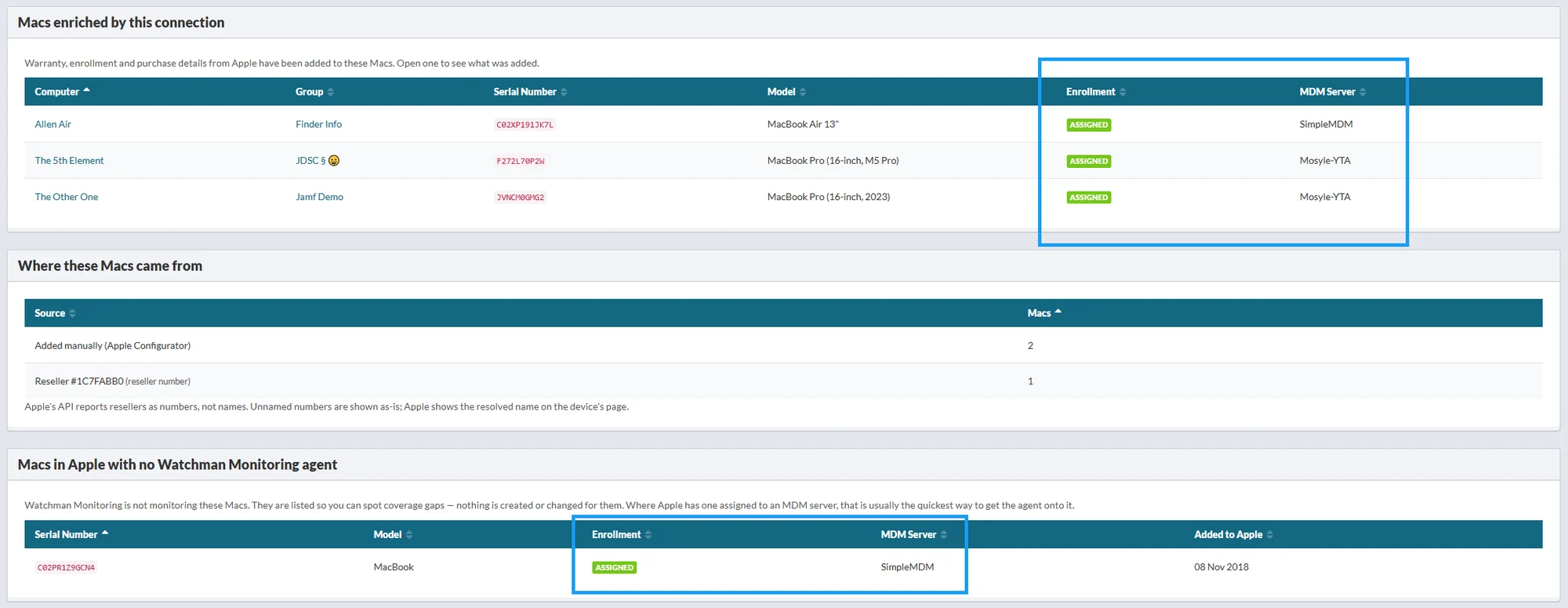
The Macs you aren't monitoring. Every Apple Business Manager connection lists the Macs Apple knows about that have no agent, with serial numbers and the date each was added. If a client bought fifteen Macs last quarter and you're monitoring eleven, you'll see which four.
Every computer's last check-in. The agent reports hourly, Chromebooks sync from Google Workspace, and Beacon Reporting tells you when a machine that matters has gone quiet.
Which MDM each Mac is assigned to. Apple Business Manager shows each Mac's MDM server, flags Macs assigned to Apple Configurator, and flags Macs assigned to no MDM at all.
Prebuilt checks
No scripts to write or maintain
In an RMM or MDM, monitoring something new usually means writing a script, testing it on every OS version, and fixing it when the next release breaks it. Watchman Monitoring ships 150+ checks for backups, disks, encryption, security tools, OS stability and more, and we keep them working on every new macOS and Windows release.
They come with sensible defaults, and Monitoring Policies let you decide once how a check should notify you across hundreds of computers. If you need something we don't have, you can still write your own plugin.
Warranties and expirations
Know what's about to lapse
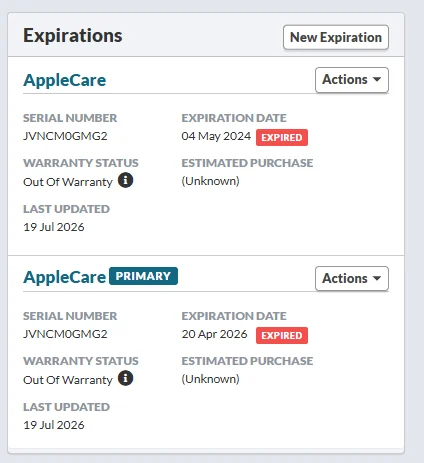
AppleCare and warranty dates come straight from Apple Business Manager, including whether Apple still considers a plan live, so a refunded plan isn't reported as coverage. Add your own software licenses, domains and contracts alongside them, and they all reach you in the same expiration notices, sixty days ahead.
For Chromebooks, each device's auto-update expiration date comes from Google Workspace, on its page and in your CSV exports.
Your PSA
Findings go where your team already works
- Tickets where you work.
- Findings open tickets in Autotask, ConnectWise PSA, HaloPSA, Zendesk or RepairShopr, instead of another inbox to watch.
- Documentation linked.
- Computers link to their IT Glue configurations.
- Remote support one click away.
- Open ScreenConnect, TeamViewer, SimpleHelp and others from a computer's page.
- Webhooks for the rest.
- Post alerts to Slack, Microsoft Teams, Discord or any HTTPS endpoint, and pull anything else from the API.
PSA & ticketing
- Autotask
- ConnectWise PSA
- HaloPSA
- RepairShopr
- Zendesk
Documentation
- IT Glue
MDM & device management
- Apple Business Manager
- Apple School Manager
- Addigy
- Jamf Pro
- Zentral
- Google Workspace
Remote support
- ConnectWise ScreenConnect
- BlueSky
- BeyondTrust (Bomgar)
- LogMeIn
- SimpleHelp
- TeamViewer
- VNC
Webhooks & chat
- Slack
- Microsoft Teams
- Discord
- Any HTTPS endpoint
Billing and reporting
Bill from a count you can trust
When computers are split across three tools, counting what each client has is a spreadsheet job. In Watchman Monitoring, every computer is in a group, one per client if you like, with its platform and when it last reported.
- CSV exports of computers, expirations and plugin results, with the columns you choose: group, platform, last report, warranty status, serial number, and Apple's order and purchase details.
- Scheduled group reports: a PDF for each client, monthly or quarterly, showing what's being watched and what was found. We email you when they're ready.
- A purchase report for each Apple Business Manager connection, grouping a client's Macs by where they were bought.
See your whole fleet in one place.
Start a free 30-day trial. Every feature, no credit card, and most teams see their first findings on the first check-in.