Release notes · Mac Client · News · Release Notes
Mac Client – 6.6.9.122 – SMART, Drive Type, and Notarization
In addition to 6.6.9.110 update, this release includes:
Features
- SMART plugin reports Drive Type (SSD vs Rotational)
- SMART plugin reports Serial Number of drive.
- Notarization of installer packages for macOS *
How to get this update
To apply this update to your account now and not wait for our auto rebuild process, visit your installers page, and click the publish button. All computers set to automatically install new versions will install the latest update upon next check in.
Updated Betas
Splashtop Business will generate an integration button for non-business versions of Splashtop. The link created will not work. A fix to exclude links for non-business versions of Splashtop is in development.
The beta of Retrospect Client for Mac is available. All subscribers who have requested access will have the beta automatically deployed to their monitored computers.
You can request the beta here.
Keep an eye on our Community Forum for news of incremental changes, and we will keep emailing major release notes.
About the Timing of macOS Installer Notarization
- See /known-issues
* Your account’s macOS Monitoring Client installer is notarized at the time of publication. Newly created group installers and enrollment code installers are also be notarized, however they are currently made available for download before the notarization process completes. We are working to improve the delivery, especially to end users.
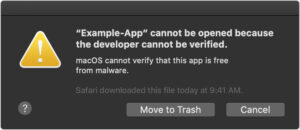 At this time, users are able to download and attempt to open the installer before the process is complete, and may see the following warning dialog:
If the user attempts to install again a few minutes later, installation will complete, since that same package is known by Apple to be notarized.
We are aware of the issue. We are working to add additional checks to prevent download of enrollment code installers until Apple has completed notarization.
Of note, scripted macOS installation does require notarization and will not display the dialog or warnings mentioned above.
Additionally, deployment of our installation package via MDM will work as expected.